Image: Playground Games/Xbox Game Studios via Polygon
The customization options have been ramped up in Forza Horizon 6, so knowing how to customize your garage is essential if you want the place you store your cars to look the best it possibly can. What's even better is that you can earn a few credits this way too, if other players download your garage and use it for themselves.
How to customize your garage in Forza Horizon 6
Image: Playground Studios/Xbox Game Studios via Polygon
Whenever you visit one of your houses in Forza Horizon 6, you can customize the garage attached. Since there are eight houses in total, including Mei's house that you start with, there are eight garages you can customize and spend your hard-earned credits on.
To customize a garage, visit one of your houses and navigate to the "Customizable Garage" tab along the top. If you want to do up your garage from scratch, select the "Customize Garage" option. This will take you to a free camera mode where you can place as many props as you like from the prop library, as long as you have the credits and don't go over the prop limit. To get rid of props, you'll need to hover over them and manually remove them. Alternatively, you can empty out your entire garage by returning to the menu, selecting "Browse & Manage," and choosing "Empty My Garage."
Image: Playground Studios/Xbox Game Studios via Polygon
If you don't want to spend time customizing your own garage, you can download a design made by another player. Go to the "Browse & Manage" option in the menu, then select "Browse Community Garages." Here, you can search for garages and download them as you please, but you'll need to spend credits applying the layout to your garage if you decide to use it.
Finally, you can choose which cars from your collection you want to display in your garage by choosing the "Display Cars" option, and if you want your garage to be open to visitors, simply toggle "Visitor Permission" from closed to open.
.png)
 2 months ago
15
2 months ago
15

 Image: Playground Games/Xbox Game Studios via Polygon
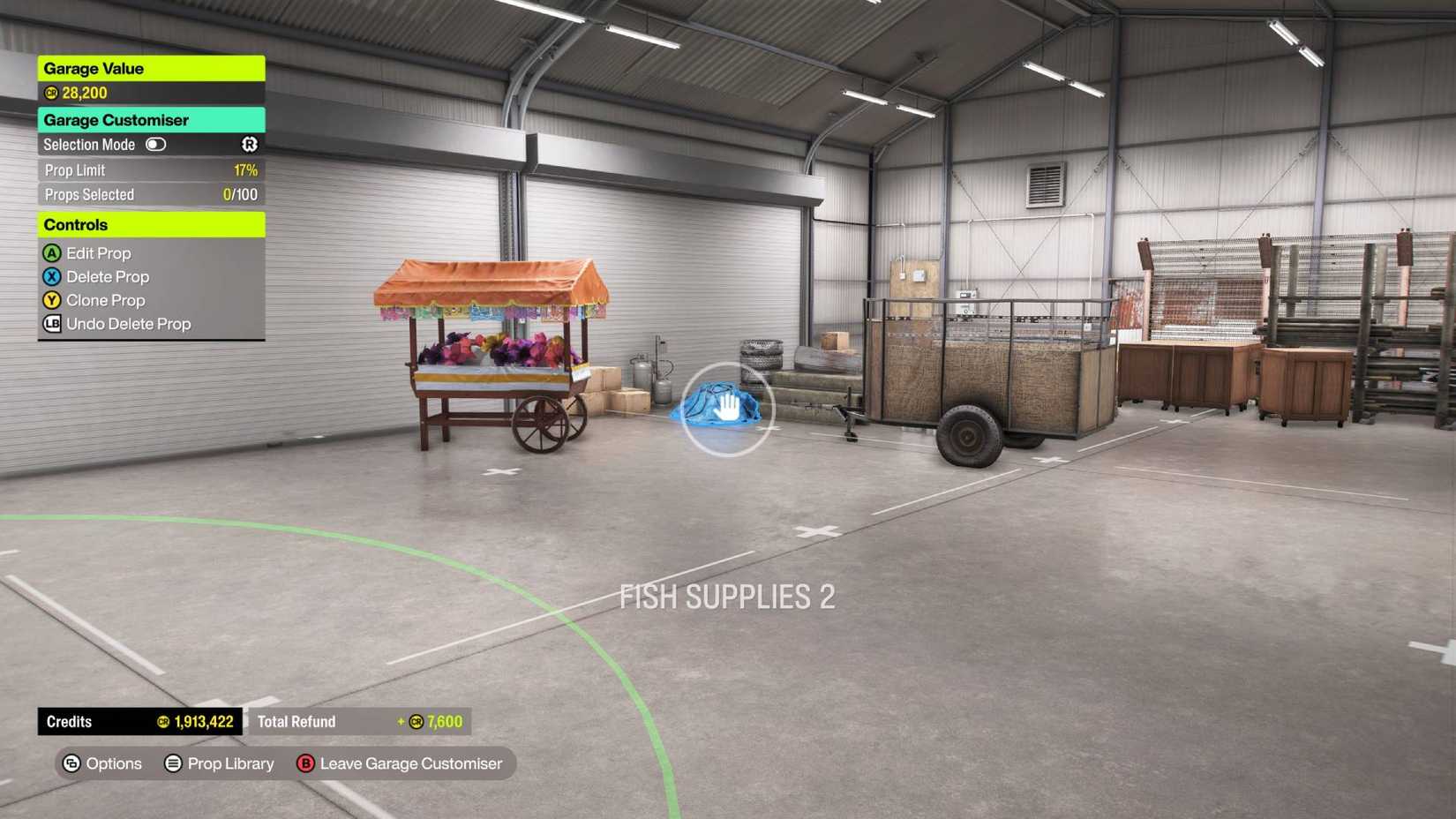 Image: Playground Studios/Xbox Game Studios via Polygon
 Image: Playground Studios/Xbox Game Studios via Polygon






![ELDEN RING NIGHTREIGN: Deluxe Edition [FitGirl Repack]](https://i5.imageban.ru/out/2025/05/30/c2e3dcd3fc13fa43f3e4306eeea33a6f.jpg)
 English (US) ·