.png)
.png) 6 months ago
140
6 months ago
140

StarRupture is a survival game, which means you will need to consistently collect materials like Wolfram Ore, build materials, and craft structures to survive. One nice thing about the game is that you can automate the process of collecting materials through the use of drones.

Related
StarRupture: How to Get Rotor and Tube Blueprints
On an Alien Planet you need everything you can find.
Drones are a great way to automate many of the processes you would normally have to perform manually. They can collect materials, craft building materials, and more.
Of course, you need to know how to properly use the drones for this process. Let's break down everything you need to know about drones in StarRupture.
What Can Drones Do?

Drones operate on rails that connect to various structures built around your camp. They start at the Ore Excavator, which is placed on ore deposits for resources like Calcium.
From here, drones can be connected to various structures around your base. These structures include the Smelter, which is used to smelt ore into blocks and bars, the Fabricator, which is used to refine materials, the Furnace, which is used to create even more complex materials, and the Assembler, which is used to craft various items.
Drones can also deliver materials via the Orbital Cargo Launcher, which delivers materials to corporations. This then increases your experience with the corporation, increasing your level over time.
For those who want to store materials, drones can also be connected to storage depots. This allows you to store 400 of one of the materials that the drones will automatically deliver. These storage depots can be upgraded to hold more items.
How to Connect Drones

Drones follow a rail system, which is connected to various buildings around your base. This allows the drones to move from one building to another seamlessly.
Numerous rail structures help drones get from point A to point B. These include:
|
Standard Rail |
Used to move drones from one area to the next. |
|
Rail Support |
Used to support a rail over long distances. |
|
Rail Connector |
Used as an intersection for rails to connect one rail to multiple objects or multiple rails to one object. |
|
Multirail 3 |
Allows three drones to run side-by-side on three rails. |
|
Rail Modulator 3 |
Splits one rail into three. |
|
Rail v.2 |
A faster version of the standard rail, allowing drones to move faster. |
|
Multirail 5 |
Allows five drones to run side-by-side on five rails. |
|
Rail Modulator 5 |
Splits one rail into five. |
|
Rail v.3 |
The fastest version of the standard rail allows drones to move more materials at a faster rate. |
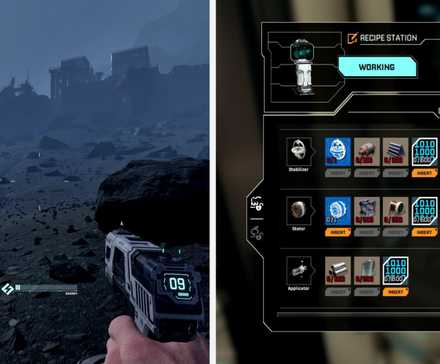
Drones will snap onto the building and move in the direction the rail is built. It is good practice to build rails coming from an excavator and leading into other buildings.
Related
Trying to connect a rail to a building in a direction it cannot go will result in your being unable to build. When you build a structure that a rail can attach to, it will show you the direction the drones must run through the building.
Drones require power to operate. Luckily, rails count as a means of running power to your base. Be sure that your base is connected to power so that the drones can run on the rails.
Obtaining Upgraded Rails

Upgrading your rail system will take some time, as you will need to level up a specific corporate faction to unlock new equipment. The corporation in charge of drone parts is Clever Robotics.
As you progress through the levels, you will unlock more rail types, allowing you to build better systems for your drones. At level one, you unlock the basic drone items, such as rails, connectors, and more.
After reaching level five, you will have access to Multirails. Level six will grant you access to version two of the standard rail, and level 10 will grant you access to more Multirails.

Systems

Released January 6, 2026
Developer(s) Creepy Jar
Publisher(s) Creepy Jar
Multiplayer Online Co-Op
Number of Players Single-player








![ELDEN RING NIGHTREIGN: Deluxe Edition [FitGirl Repack]](https://i5.imageban.ru/out/2025/05/30/c2e3dcd3fc13fa43f3e4306eeea33a6f.jpg)
 English (US) ·