.png)
 3 months ago
18
3 months ago
18
When Valve sent me a Steam Controller earlier this month ahead of its release on May 4, I wasn’t sure what to expect. The original Steam Controller, released back in 2015, was an interesting experiment, but not a controller I’d ever use daily. And the new, upcoming Steam Controller looked a bit less weird, but still not quite like most gamepads out there. Plus, there was a tiny little puck that you connected to your computer that also charged it. That seemed neat, but potentially finicky.
But after using the Steam Controller and its tiny little puck for a few weeks to play a plethora of PC games, I’m no longer skeptical that this thing is a great controller. I am, however, still skeptical about whether $100 is the right price for this controller, even if it’s my favorite PC gamepad in years. I think it’s worth it, but I’ll be curious to see if Valve can convince others to pay that price.
I’ll admit that the Steam Controller ain’t a looker. It looks bloated and is covered in buttons, pads, sticks, and more buttons. And when you turn the controller around, you’ll find four more buttons hidden in the grips, which themselves can be used as input devices, too. At first, holding it felt strange. But once I realized the back buttons take some amount of effort to press, I started holding it like an Xbox controller, and soon, it felt just as natural. Still, this odd design might scare away some, but Valve had a good reason for going with it. Valve told Kotaku it wanted the Steam Controller to contain all of the input options found on the Steam Deck. And it does. That means if you play Steam Deck games using a specific layout, it will just work on the Steam Controller.
That’s the motto of the Steam Controller: It just works. Even using beta software, that was my experience with the new gamepad.
It just works
Setting it up is super easy. You plug in the USB puck (which is not hardwired to the cable, thankfully) into your PC, and assuming you have Steam installed, it will detect that and walk you through the simple setup. This process mostly consists of attaching the Steam Controller to the puck via a magnetic connection, updating the puck and the pad, and then unhooking the controller from its plastic partner, and there you go. That’s it. No Bluetooth fuckery to be had and no dealing with signals and different input settings.
Whenever I wanted to use my Steam Controller, I just grabbed it, tapped the Steam logo button on it, and was off to the races. And it worked every time. Another press of the Steam button and Steam opened up into Big Picture mode, and I was playing Windrose and other games easily. When I was done, I tossed it onto the magnetic charging puck and left it there. Valve engineers told me that it won’t overcharge, and the puck is designed to keep the battery healthy for as long as possible.
Once I had the controller up and running, I threw a few different games at it. I played many hours of the recently released pirate game Windrose using the controller and had no issues. I appreciate the back buttons on the Steam Controller, as I could easily assign some of Windrose‘s features, which are buried in a few menus or sub-menus, to the back buttons. Entering and exiting build mode on the Steam Controller was a breeze once I set up a back button shortcut.
Other games I tried included Grand Theft Auto V, Fallout 76, Portal 2, Vampire Crawlers, and Borderlands 4. All of these worked without any issue, and unless I set up some back button shortcuts, I’d quickly forget I was even using a Steam Controller while playing games. I also tested out Jurassic World Evolution 3, Civilization, and Two-Point Museum, games that aren’t great on a controller normally. And while I still think these are games best played with a keyboard and mouse, the Steam Controller’s touch pads and extra inputs did make these far more playable.
Even more impressively, I tried out a few non-Steam games, including GTA: Carcer City, a mod for San Andreas, and while I needed to change a few buttons, after a bit of tinkering I was playing the mod with no issue through Steam. So yes, any emulator or other game or mod you have running through Steam will work, with some effort, with the new controller.
The actual controller is great
The basic bits of the Steam Controller, like the analog sticks, face buttons, triggers, and bumpers, are nearly identical to the Steam Deck’s controls. This isn’t a bad thing! The Steam Deck feels great, and I love playing games on it. So getting that same level of quality in a smaller controller I can use on my desktop PC is a treat.
A special shout-out to the d-pad, which might be my favorite d-pad on a controller now. I sometimes pick up the Steam Controller and flick around its sticks and press its buttons just as a way to give my fingers a break from typing. Or just to have a bit of fun during the day.
Even better, when docking my Steam Deck, I now have all of the controls and inputs on a gamepad that I can use on my couch. And while the Steam Controller does include a Bluetooth mode, I just plugged my puck into the Steam Deck dock, and once again, it just worked.
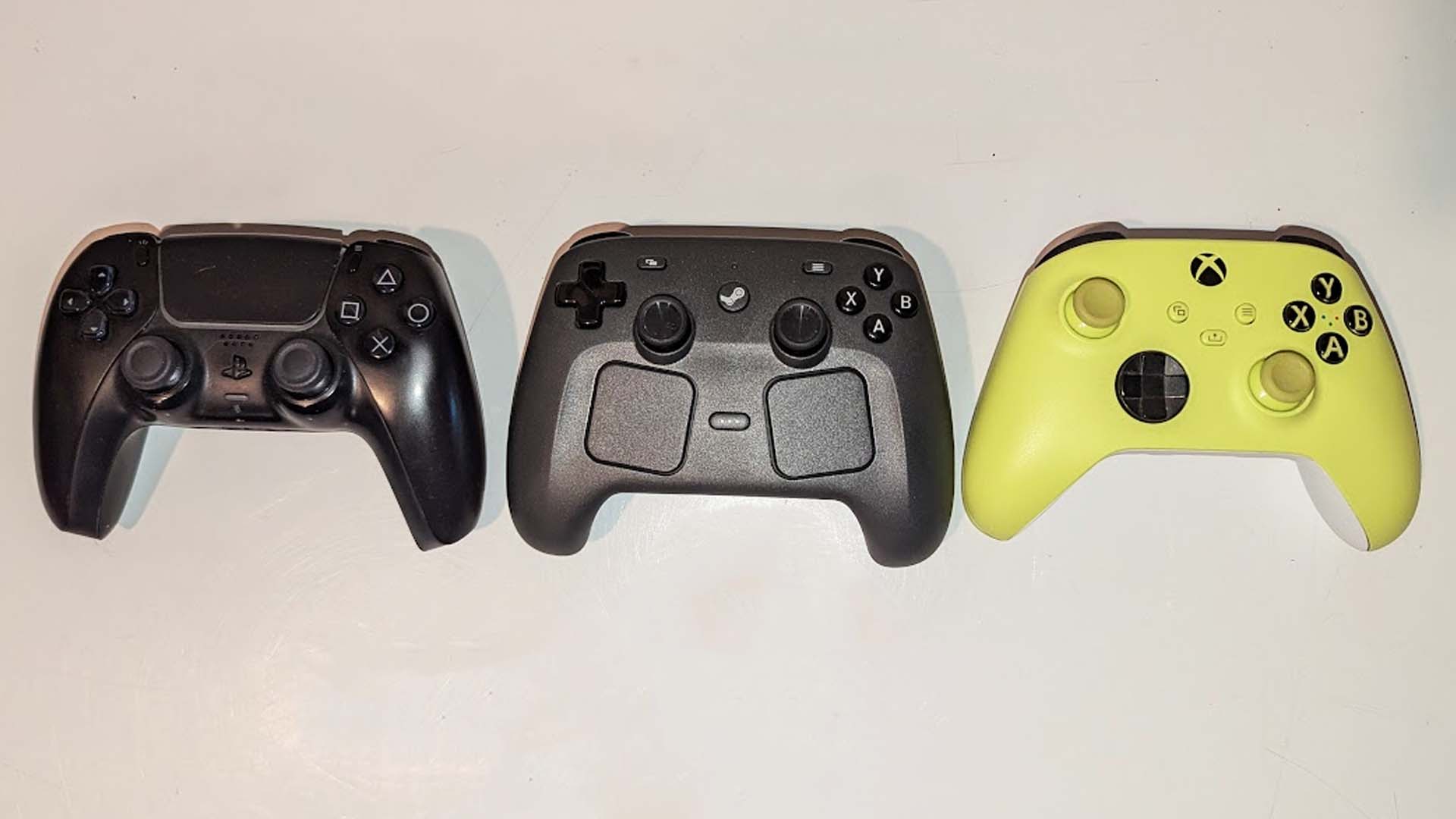 A PS5 Dualsense, Steam Controller, and Xbox controller © Kotaku
I know some might look at the controller and worry that it will feel terrible to hold, but Valve has done a lot of work to ensure that the Steam Controller feels perfect in the hands. And in my experience, it does. The grips are wide enough that it remains stable in your palms, but thin enough not to feel overly bulky. The weight is also perfect, with the heaviest bits located in the middle and bottom sections of the controller, but still balanced to not feel like it wants to fall out of your hands.
Oh, and if you liked smelling the vent fumes from the Steam Deck, as I do, you’ll be pleased to know that the USB-C port at the top of the Steam Controller contains the same chemical aroma. Valve might tell you not to do this, but I’m not your dad. Knock yourself out, champ.
Battery life has been great for me so far, and the charging puck makes it a breeze to juice it back up during a session. Range also seems comparable to that of other wireless console controllers, so your living room setup should work just fine with the Steam Controller.
Okay, but is the Steam Controller worth $100?
This is the all-important question. Is the Steam Controller worth the $100 price Valve is asking for it? I think that answer will come down to a few factors.
Do you feel like your current PC gaming controller is lacking? If you have a great setup, all your games work fine, and you have no problems to solve, then the Steam Controller might not be worth the investment. If you don’t play a lot of PC games, this thing ain’t worth $100 either, as it doesn’t work with consoles. I plugged it into a PlayStation 5 and could move around the main menu, but nothing else seemed to work. Valve has made it clear that this is a PC controller and there is currently no support for Switch, Xbox, or PlayStation. And if you mostly play PC games that don’t work well with a controller and you mainly do this at your desk, then I’m not sure you’ll get much out of the Steam Controller.
I think the main customers for the Steam Controller are going to be people who love their Steam Deck and dock it all the time. These players will get a huge boost from the Steam Controller and its extra inputs and compatibility with Steam Deck controller layouts. I also imagine people who primarily play everything, including console ports and so forth, on a PC might like the Steam Controller, as it will slot into their life perfectly as a simple replacement for an Xbox controller that will work fantastically with Steam.
And of course, when the Steam Machine launches… eventually, the Steam Controller will be perfect for it. In fact, Valve is including a Steam Controller with the Steam Machine. So you don’t need to buy one now to have on hand for when that console-like device launches, but if you want two controllers, well, why not, I guess?
Really, it comes down to whether you think $100 is worth it for a very well-made, easy to mod, simple as heck to use, and super-compatible PC gamepad that feels fantastic and premium. If that sounds like a fair trade, then the Steam Controller is for you. If that doesn’t seem like a good deal, well, you probably didn’t make it to the end of this review anyway, huh?
The Steam Controller is out on May 4. You can pre-order it now on Steam.








![ELDEN RING NIGHTREIGN: Deluxe Edition [FitGirl Repack]](https://i5.imageban.ru/out/2025/05/30/c2e3dcd3fc13fa43f3e4306eeea33a6f.jpg)
 English (US) ·